
Welcome back to Info ITI, your trusted technical learning space for trade theory, workshop practice, and vocational exam updates! If you have been anxiously refreshing the portal for your NCVT ITI Result and e-marksheet verification, we completely understand your anxiety. Waiting for your scores after months of practical workshop assignments and Computer-Based Test (CBT) preparation is never easy.
At Info ITI, our core mission is to make technical learning straightforward and support trainees at every step of their journey. In this master guide, you will learn how to check your scorecard online, fix common roll number errors, handle portal downtime, download your official National Trade Certificate (NTC), and explore career opportunities after passing out.
Table of Contents
Understanding the NCVT Examination & Marking System
The National Council for Vocational Training (NCVT), working under the Ministry of Skill Development and Entrepreneurship (MSDE), conducts nationwide examinations for engineering trades (like Fitter, Electrician, Turner, and Machinist) and non-engineering trades (such as COPA and Welder). Your final scorecard evaluates two major components:
- Practical & Formative Assessment: Evaluated directly at your institute based on hands-on workshop jobs, safety compliance, and trade discipline.
- Computer-Based Test (CBT): Online theoretical examination covering Trade Theory, Workshop Calculation & Science, Engineering Drawing, and Employability Skills.
Scoring high in these exams requires strong fundamentals. Reviewing core concepts like Occupational Health and Safety rules and learning to handle Precision Measuring Instruments will help you excel in both practical assessments and competitive job interviews.
NCVT ITI Result & Certification Highlights
| Parameter | Official NCVT Standard |
|---|---|
| Exam Authority | Directorate General of Training (DGT) / NCVT |
| Testing Mode | CBT (Online) + Practical Workshop (Offline) |
| Official Web Portals | Skill India Digital Hub & NCVT MIS Portal |
| Document Issued | National Trade Certificate (NTC) / e-Marksheet |
| Grievance Period | 30 Days from Result Declaration |
Real Student Issues: Common Result Errors & Easy Fixes
When results go live, heavy server load often leads to portal glitches. Based on real feedback from our Info-ITI student community, here is how you can resolve the most frequent issues:
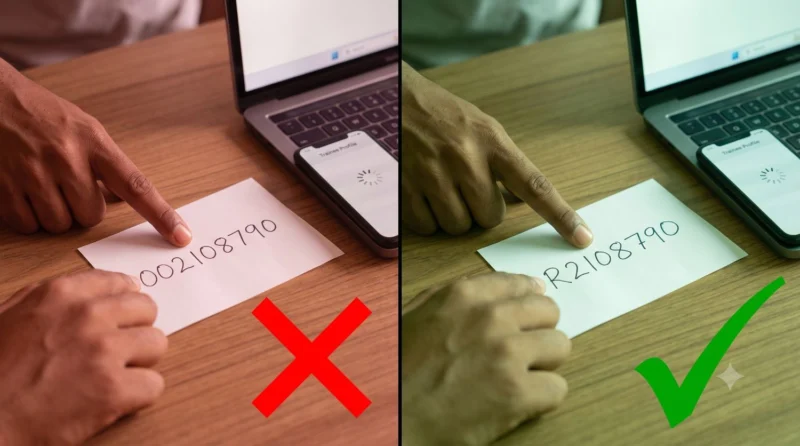
1. “Invalid Roll Number” Notification
The Problem: Typing your roll number exactly as written on your admit card (e.g., 002108...) often returns an invalid entry warning.
The Fix: Remove the starting two zeros (00) and add a capital ‘R’ at the front (e.g., R2108...). This allows the system to pull up your trainee profile immediately.
2. Server Timeout / “This Site Can’t Be Reached” Error
The Fix: Due to lakhs of students logging in simultaneously, the main ncvtmis.gov.in server may throw an ERR_CONNECTION_TIMED_OUT error. Do not panic! Use the alternate Skill India Digital Hub portal, switch your browser to Incognito Mode, or try checking during off-peak hours (early morning 6:00 AM – 8:00 AM or late night).
3. Practical or Sessional Marks Missing
The Fix: Practical scores are uploaded manually by state examiners and college staff. Allow 48 to 72 hours for server synchronization. If the marks remain blank, contact your ITI college administration to ensure your internal marks were submitted on the portal.
Step-by-Step Guide: How to Check Your NCVT Result Online
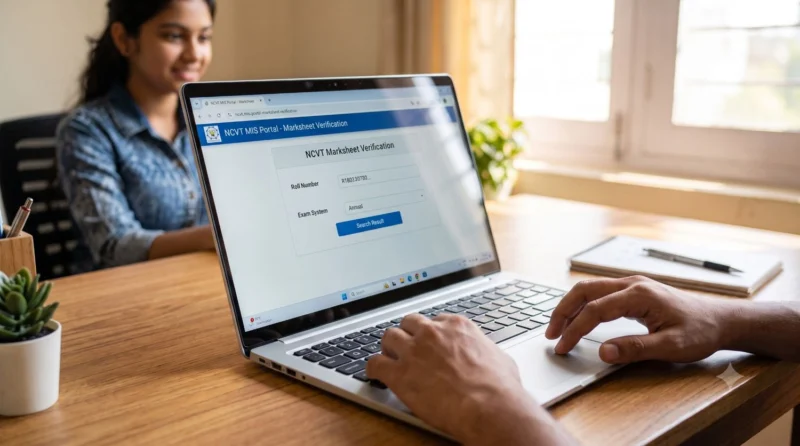
Follow these quick steps to access and verify your scorecard online:
- Open the official website: Skill India Digital Hub or NCVT MIS Marksheet Portal.
- Locate the Trainee option on the top menu bar and select Marksheet Verification.
- Type in your Registration / Roll Number using the correct prefix format (e.g.,
R...). - Select your Exam System (Annual or Semester) and choose your specific Year/Semester.
- Click Search to load your official scorecard.
- Check all trade theory and practical marks carefully, then click Download Marksheet PDF for future reference.
NCVT ITI Marksheet & Result Portal
Direct access to download your official e-Marksheet and National Trade Certificate (NTC) securely from government servers.
Passing Marks & NCVT Grace Marks Guidelines
To clear your ITI trade examinations, trainees must meet the official passing thresholds across all evaluation components:
- Trade Theory & Employability Skills: Minimum 33% score required in CBT online tests.
- Practical Examination: Minimum 60% score required in workshop practical performance.
- Formative Assessment: Minimum 60% internal score awarded by your institute.
Grace Marks System: Under DGT rules, if a trainee is short by 1 to 2 marks in CBT theory papers, the portal system automatically awards grace marks to clear the subject, saving you from appearing in supplementary exams.
How to File an NCVT Grievance on the Portal
If you spot spelling errors in your personal details or notice an issue with your subject marks, do not accept the result immediately on the portal. Follow these steps to file an official grievance ticket:
- Log in to the NCVT MIS portal and navigate to your Trainee Profile.
- Click the Raise a Grievance button.
- Select the grievance category: Personal Details Grievance (for name/DOB changes) or Examination Grievance (for subject mark corrections).
- Attach supporting documents (e.g., 10th marksheet or admit card) and submit the request.
- Save your grievance tracking ID to check correction updates online.
Next Steps After Passing Your ITI Exam

Downloading your marksheet is an important milestone, but planning your next career step is equally vital. Here are three main pathways recommended by the Info ITI team:
1. Register for NAPS Apprenticeship
Apply immediately on the National Apprenticeship Promotion Scheme (NAPS) portal. Landing a 1-year apprenticeship in top organizations like Railway Workshops, BHEL, DRDO, or IOCL gives you hands-on industrial expertise alongside a monthly stipend.
2. Prepare for Technical Government Recruitment
Keep your original National Trade Certificate (NTC) safe. You are now eligible to apply for central and state government jobs, including Railway Assistant Loco Pilot (ALP), Technician Grade 3, ISRO Technician, Metro Rail Maintenance, and State Electricity Board Lineman posts. Building strong subject basics, like understanding workshop hand tools such as Types of Pliers and core manufacturing processes like Heat Treatment Techniques, will give you a distinct edge in competitive written tests.
3. Pursue Higher Education (Diploma Lateral Entry)
If you wish to advance your technical qualifications, NCVT pass-outs can gain direct lateral entry into the 2nd year of Polytechnic Diploma engineering programs. This pathway opens opportunities for Junior Engineer (JE) roles across major industries.
Frequently Asked Questions (FAQs)
Q1. Where can I verify my NCVT ITI Marksheet online?
You can verify and download your marksheet on the official NCVT MIS Marksheet Verification portal or via the Skill India Digital Hub.
Q2. How do I fix the invalid roll number error on the portal?
Replace the first two zeroes (’00’) of your roll number with a capital letter ‘R’ (for example, R21080…). This allows the system to recognize your trainee profile correctly.
Q3. Is the online e-Marksheet valid for government job applications?
Yes, the digital e-Marksheet and National Trade Certificate (NTC) downloaded from official portals are fully valid for all central and state government job applications and apprenticeship registrations.
Q4. What should I do if I failed in one CBT theory subject?
You can appear for the NCVT supplementary examinations, which are conducted 2 to 3 months after the main result declaration. Keep following Info-ITI for study materials and CBT exam updates.
Q5. How long is the NCVT grievance window open after results?
Trainees can raise a grievance regarding personal details or exam marks within 30 days of the official result publication on the NCVT MIS portal.
Conclusion: Building Your Technical Future
Your NCVT ITI Result is a clear reflection of your dedication, technical knowledge, and practical workshop skills. Whether you cleared your exams with top marks or are preparing to clear a supplementary paper, remember that vocational training is a continuous journey of learning and hands-on growth. The National Trade Certificate (NTC) you earn is respected across public sector enterprises, manufacturing industries, and international technical employers.
At Info ITI, we are committed to supporting vocational trainees with accurate exam updates, study materials, mock tests, and career notifications. Stay focused, keep practicing your trade skills, and step confidently into your professional career!
💬 Need Help With Your ITI Marksheet or Result?
Are you facing an issue while checking your scorecard, or do you need guidance on apprenticeship applications? Drop a comment below with your Trade Name and State! The Info ITI technical support team will guide you personally.
📢 Found this guide helpful? Share it with your ITI college WhatsApp groups and classmates!